Real Time Phone Locator GPS
- 0.0
- Rating
- 10.00K
- Installs
- Free
- Price
 Analysis by App-foxy
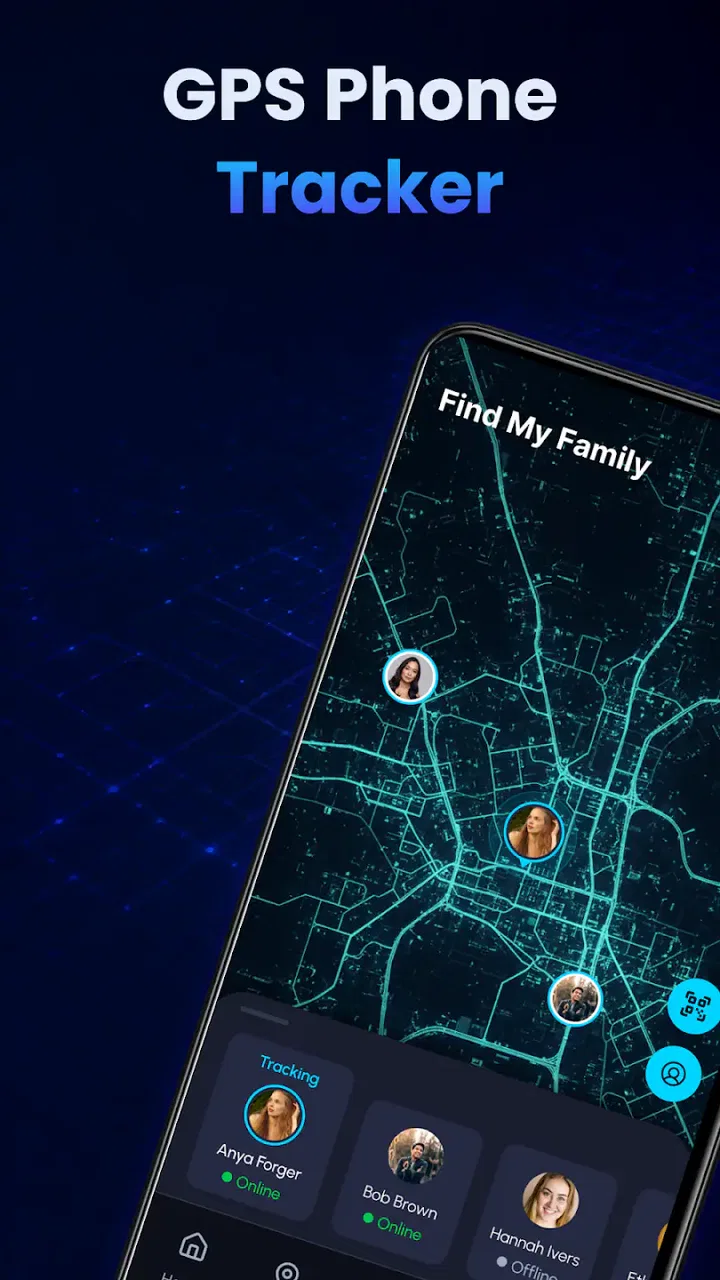
When I try a phone-locator app, I do not begin with the map. I begin with trust. Location tools can be genuinely useful, but they also deal with information that can reveal where a person lives, works, travels, or spends time. Real Time Phone Locator GPS presents itself as a free Maps & Navigation app from Nova Xponential Power, designed around staying connected, sharing a location, and finding nearby places through GPS tools. That combination makes it potentially handy, but it also means the quality of the experience depends heavily on how clearly the app explains its controls and how carefully I use it.
My overall impression is that this is best approached as a focused utility rather than a complete replacement for every mapping or family-safety service. It has a clear everyday purpose: use the phone’s location capability when I need to orient myself, share where I am, or look around the area. The current release is version 1.0.2, and the app is available at no cost for people using Android 8.0 or later. It is marked suitable for Everyone, while the practical responsibility still belongs to the person holding the phone: location sharing should always be intentional, limited, and easy to stop.
What I looked at before trusting a location app
The developer name matters here because a location app is not just another casual tool. Nova Xponential Power is the company behind this release, and the app has passed the early adoption stage with over ten thousand installs. That does not prove that it is the right choice for every situation, but it does give the product a real user base rather than making it feel like an entirely untested download.
You May Also Like

 Pandora - Music & Podcasts
Pandora’s Music Is Easy to Start, but Harder to Recover
Pandora’s strength is its low-effort path from a seed to a station. Its weak spot is how much confidence it asks you to place in connection, setup, and quiet recovery.

 AccuWeather: Weather Radar
AccuWeather Review: A Quick, Clear Forecast for Everyday Decisions
For everyday plans, the best forecast is the one you can understand quickly. AccuWeather makes rain timing, radar, and local conditions easy to act on, with a few trade-offs.

 Hill Climb Racing
Why Hill Climb Racing Still Turns Crashes Into One More Run
A tiny car, a bumpy hill and one more upgrade: Hill Climb Racing keeps resurfacing because its simple chaos makes every near-miss feel personal.

 AliExpress - Shopping App
AliExpress Makes Global Shopping Feel Personal, but Shoppers Bear the Risk
AliExpress turns a global marketplace into a pocket-sized discovery engine. Its reach is useful, its shopping loop compelling, and its trade-offs easy to miss.

 Lords Mobile: Kingdom Wars
Lords Mobile Is a Kingdom-Building Routine, Not a Quick Match
A case-by-case verdict on the building, battles, device demands, and social commitments that make Lords Mobile rewarding for some players and exhausting for others.

 PDF Scanner app - TapScanner
TapScanner Makes Paperwork Easier to Capture, Check, and Share
TapScanner makes scanning with a phone feel less like a rescue operation and more like a dependable step in getting work done. Its capture tools are useful, though not flawless.
More From Our News Desk
View All News


I also pay attention to the difference between a store promise and an actual decision I would make on my own phone. “Phone Locator” is a very short description, so I would not read it as a guarantee of a full emergency-response system, a professional fleet platform, or a permanent family-monitoring service. I would use it for straightforward location tasks and judge each request for access according to what I am trying to do at that moment.
The free price lowers the barrier to trying it, but free does not automatically mean private or frictionless. With any GPS utility, I want to see why location access is being requested, whether the app still works when access is limited, and whether sharing is something I actively start rather than something that quietly continues. Those are the questions I would keep in mind during setup and normal use.
Because this is an early version, I would also keep expectations realistic. A version 1.0.2 release can be perfectly useful for a simple task while still feeling less mature than a long-established navigation platform. I would not make it the only tool I carry for a critical journey until I had personally tested it in the places and conditions where I need it.
How the app fits into a normal day
A realistic example is meeting a friend at a busy outdoor market. Instead of describing a landmark that looks different from every direction, I can use the phone-locator workflow to help communicate where I am. The useful part is not merely seeing a dot on a screen; it is reducing the back-and-forth messages that happen when two people are searching for each other. Once the other person has found me, I would stop treating the location as something that needs to remain available and end the sharing activity if the app presents that control.
Another practical situation is arriving in an unfamiliar neighborhood. I might use the GPS tools to understand my position and explore nearby places before deciding where to walk. That is a different need from turn-by-turn navigation across a long trip. For a complex route involving multiple transport changes, road closures, live traffic, or detailed transit information, I would still choose a mature mapping service that specializes in those functions.
The distinction is important. A phone locator can help answer “where is this phone?” or “what is nearby?” It does not automatically answer every question about the safest route, the reliability of a destination, or the condition of a road. I find the app more appealing when I treat it as one focused instrument instead of expecting it to replace an entire navigation ecosystem.
Controls I would check before sharing anything
The most important control is the phone’s own location permission. I would review whether access is granted only while using the app or allowed more broadly, depending on the choices Android offers for the installation. I would choose the narrowest setting that still supports the task. If I only need to locate myself during an outing, continuous access would be difficult to justify.
I would also look for a clear start-and-stop pattern. Before sharing a position with another person, I want to know exactly what action begins the process, who receives the information, and what action ends it. If the screen makes those choices obvious, the app earns more confidence from me. If I had to guess whether a session was still active, I would close it and review the phone’s permission settings rather than assume it had ended.
Android’s system controls are especially useful as a second line of defense. I can revisit permissions after installation, change location access, and remove access altogether if I no longer need the app. That is not a substitute for good design inside the app, but it gives me meaningful agency. I would use those settings after testing, particularly if I decide that the utility is only needed occasionally.
I would not share a location simply because another person asks. The safer habit is to confirm the recipient, define the reason, and agree on when the sharing should stop. This matters even with people I know. A location link or live position can be forwarded, viewed later, or misunderstood, so the app should be part of a conversation about boundaries rather than a silent shortcut.
Where location sensitivity changes the decision
Location information becomes more sensitive in places connected with health, work, home, or personal relationships. If I were leaving a clinic, visiting a private appointment, or heading to a home address, I would pause before sharing. The convenience of being found quickly may not outweigh the detail revealed by a precise position.
I would be equally careful with a child’s phone or another person’s device. A phone locator should not become a way to monitor someone without their knowledge. For a family arrangement, I would explain what is being shared, why it is needed, and how the person can see or challenge the arrangement. The Everyone content rating describes who may use the app, not a blanket permission to track other people.
Public events create a different problem. GPS can place a phone near a crowded venue, but that does not necessarily identify the exact entrance, meeting point, or safe route. I would send a simple landmark as well and avoid assuming that the map position is precise enough for a high-pressure reunion. This is one of the trade-offs of location tools: a point on a map feels exact, but the practical meaning of that point depends on the surroundings.
Battery and connectivity are also part of the trust question, even when the app’s purpose is simple. A locator is less useful if the phone is nearly empty or the signal is unreliable. Before relying on it for a long outing, I would test the workflow at home, check how quickly the position updates for my use, and keep a conventional meeting plan. I would not treat the app as an emergency guarantee.
Small habits that make the app safer and more useful
My first habit would be to test with someone I trust before using the app in a time-sensitive situation. I would send a location, ask the other person what they can see, then stop the session and confirm that the sharing state is no longer active. This simple rehearsal can reveal confusing labels or unexpected steps before they matter.
My second habit would be to separate “finding a nearby place” from “sharing my own position.” I do not need to share my location just because I want to explore local options. Keeping those tasks mentally separate helps me avoid granting more access than the immediate goal requires. It also makes the app easier to evaluate: I can decide whether its nearby-place tools are useful without turning every search into a social-location event.
My third habit would be to review the app after a period of non-use. If I installed it for a trip or a single meetup, I would ask whether I still need it on the phone. Removing an unused location utility is a practical way to reduce future permission exposure. If I keep it, I would revisit the system permission and notification behavior so that the app remains a deliberate choice rather than something I forget about.
A fourth useful approach is to use a precise verbal agreement with the person receiving the location: “I am sharing this while we meet, and I will stop once we find each other.” That sentence sounds basic, but it turns an ambiguous digital action into a clear, limited arrangement. For me, this is more valuable than simply assuming that a location session will end automatically.
What it does well, and where another app may be better
The strongest appeal is focus. Someone who wants a free tool for phone-location tasks and nearby exploration may appreciate not having to begin with a large, feature-heavy mapping platform. The app’s purpose is easy to understand, and its support for Android 8.0 or later makes it accessible to people using older compatible phones.
It can also be a reasonable choice for occasional meetups, short local exploration, or a quick check of where a device is. In those situations, I value a direct workflow more than a long list of advanced features. The app’s Everyone rating may also make it easier for a household to consider, provided adults explain location sharing clearly and manage permissions responsibly.
However, I would choose a different option for detailed driving directions, offline maps, public-transport planning, traffic-aware routing, or a well-established family-location system with mature account management. I would also look elsewhere if my main need were professional asset tracking or a documented emergency service. A focused phone locator should not be judged as though it were built for all of those jobs.
The same caution applies to privacy-sensitive users. If I could not understand when location access was active, who could receive a position, or how to stop sharing, I would not continue using it simply because it was free. A familiar alternative with clearer controls would be the better choice. Convenience is not enough when the information involved can describe someone’s movements.
My practical verdict after weighing control and convenience
I see Real Time Phone Locator GPS as a potentially useful, lightweight location utility for people who want a simple way to orient themselves, explore nearby places, or coordinate a meeting. Its free availability, straightforward category, and compatibility with Android 8.0 or later make it easy to try. Nova Xponential Power has positioned it around a need that many phone owners understand immediately.
My recommendation comes with a condition: use it deliberately. Grant only the access needed for the task, test the sharing workflow with a trusted person, confirm when a session ends, and remove access when the app is no longer needed. Those steps are not unnecessary ceremony; they are what make a location tool fit comfortably into everyday life.
I would recommend it to a user who wants occasional GPS assistance and is willing to manage permissions personally. I would skip it as a sole solution for emergencies, complex navigation, long-term family monitoring, or professional tracking. For those needs, a specialized and more established service may offer stronger controls and a better-defined workflow.
In the end, the real measure of a phone-locator app is not only whether it can show a position, but whether I can control when that position is shared. If the app’s visible choices feel clear during my own testing, it can be a sensible addition for simple location tasks. If those choices feel uncertain, I would trust a different tool instead. That cautious approach gives the app a fair chance without treating convenience as a reason to surrender control.
FAQs for Real Time Phone Locator GPS
01What is Real Time Phone Locator GPS and how does it work?
Real Time Phone Locator GPS is a location-sharing application designed to help users view the real-time or recent position of a phone on a map. After installation, the app generally uses the device’s GPS, Wi-Fi, and mobile network information to estimate location. The person being located must normally grant permission and agree to share their position; it is not a legitimate tool for secretly tracking someone.
02Does Real Time Phone Locator GPS require internet access and GPS to function?
Yes, reliable tracking usually requires both location services and an active internet connection. GPS provides the most accurate outdoor position, while Wi-Fi and cellular networks can help estimate location when GPS signals are weak. If the phone is indoors, underground, in an area with poor reception, has battery-saving restrictions enabled, or loses connectivity, updates may be delayed or less precise.
03Is Real Time Phone Locator GPS free to download and use?
The application may be available to download at no initial cost, but some features can depend on advertising, subscriptions, or in-app purchases. Before starting a trial or entering payment details, check the store listing carefully for pricing, renewal terms, and included features. Free access may also be limited by the number of devices, location updates, or sharing options available.
04Can I use Real Time Phone Locator GPS to track another person without their knowledge?
No. Responsible location apps require consent from the person whose device is being located, and attempting to monitor someone secretly can violate privacy laws and the app’s terms of use. The most appropriate uses include locating your own phone, coordinating with family members who have agreed to share their location, or managing devices with clear authorization.
05What permissions and privacy considerations should I check before installing it?
Before installing Real Time Phone Locator GPS, review its requests for location, notifications, network access, and possibly background activity. Continuous location sharing can affect battery life and may expose sensitive information about daily routines. Read the developer’s privacy policy to understand what data is collected, whether it is shared with third parties, how long it is retained, and how to delete your account or location history.
Pros
- Simple interface makes location sharing easy for most users.
- Live GPS updates can help coordinate family members or friends.
- Useful for finding a misplaced phone when location services are enabled.
- Location links can be shared quickly with selected contacts.
- May provide reassurance during travel
- commutes
- or outdoor activities.
Cons
- Accurate tracking depends on GPS
- mobile data
- and a clear signal.
- Continuous location updates may drain the phone battery quickly.
- Sharing location can create privacy risks if access is not managed carefully.
- Some features may require subscriptions or in-app purchases.
- Background tracking may stop when battery-saving restrictions are enabled.

Real Time Phone Locator GPS
Gallery